A Bibliographic Platform for Biomedical Literature Enriched by AI.
Unlike search engines such as PubMed, which primarily index keywords in abstracts, we've developed AI models to detect specific biomedical concepts and determine their potential interactions.
Thanks to these advanced models, we have constructed a massive network of interaction between biomedical concepts, comprising more than 500 million links. This platform is the direct result of our efforts to provide you with an intuitive interface to query this immense network.
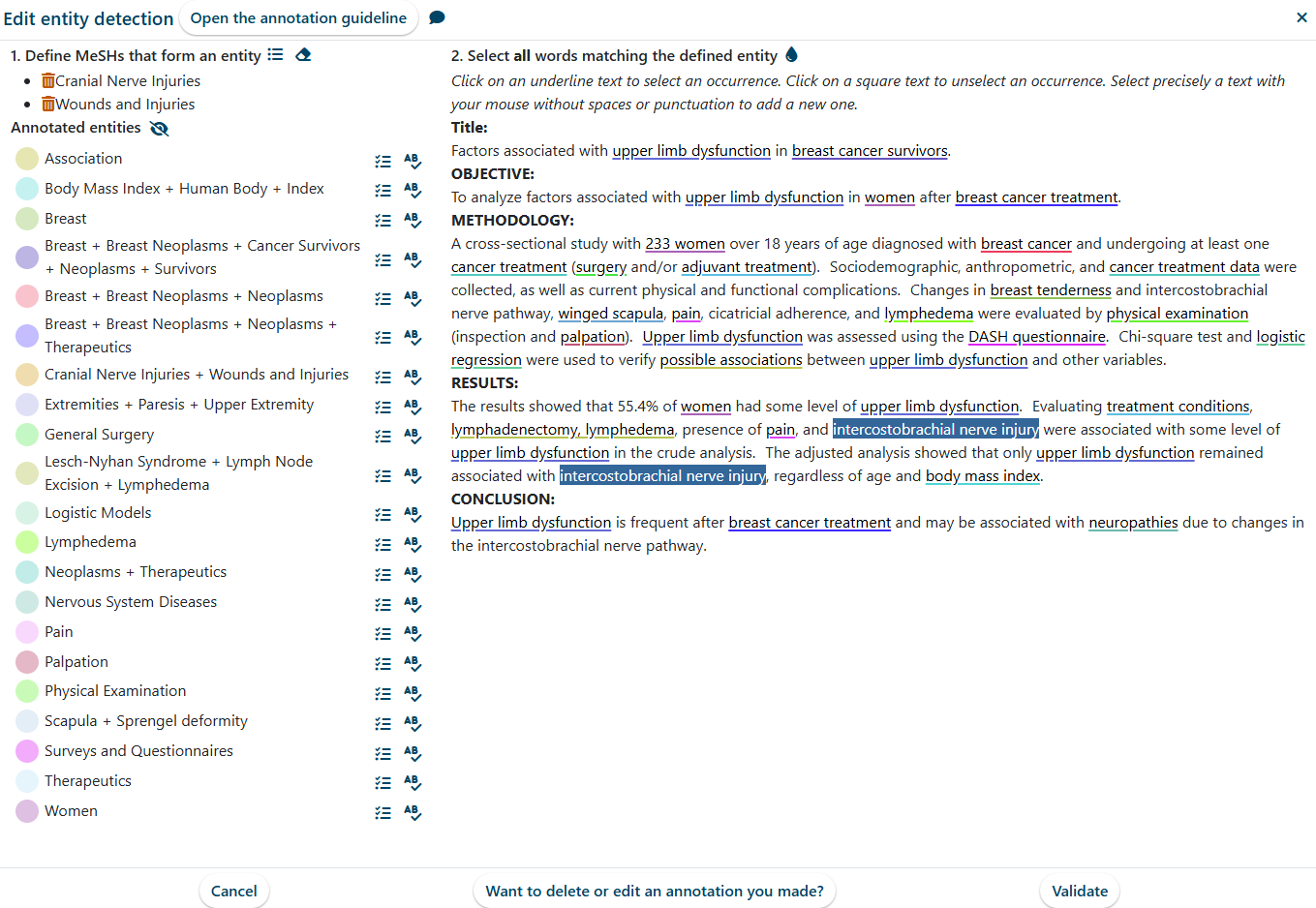
Because automated systems sometimes struggle with identifying the precise references within a text, we are building an expert community to manually produce these annotations. We encourage you to start by applying your expertise to the correction of published article.
Why is Quaesia More Powerful?
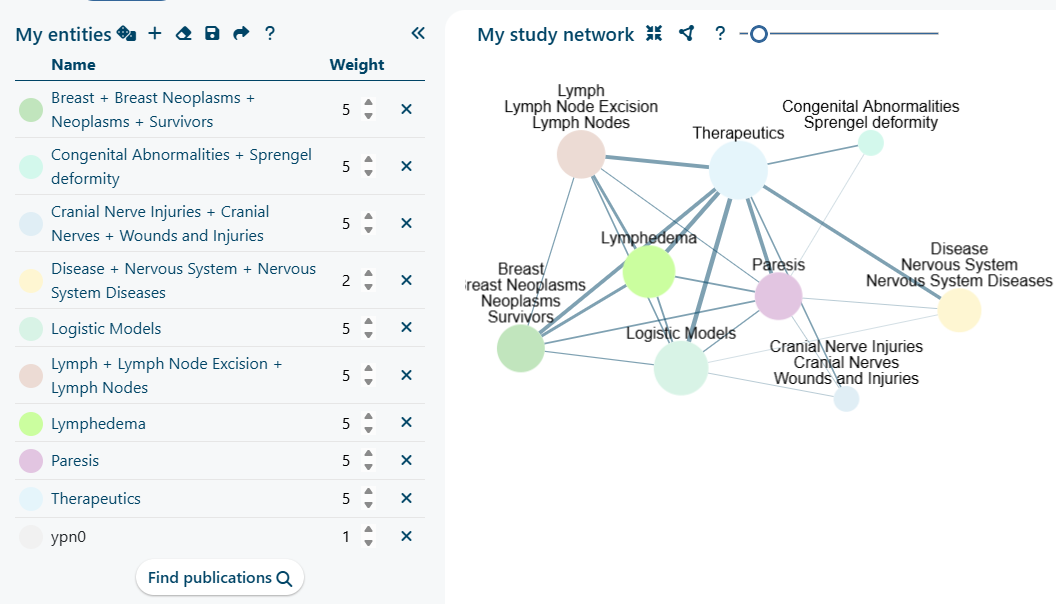
Enhanced Query Building
Our search engine is superior to conventional tools because it allows for more precise and comprehensive queries based on established biomedical concepts.
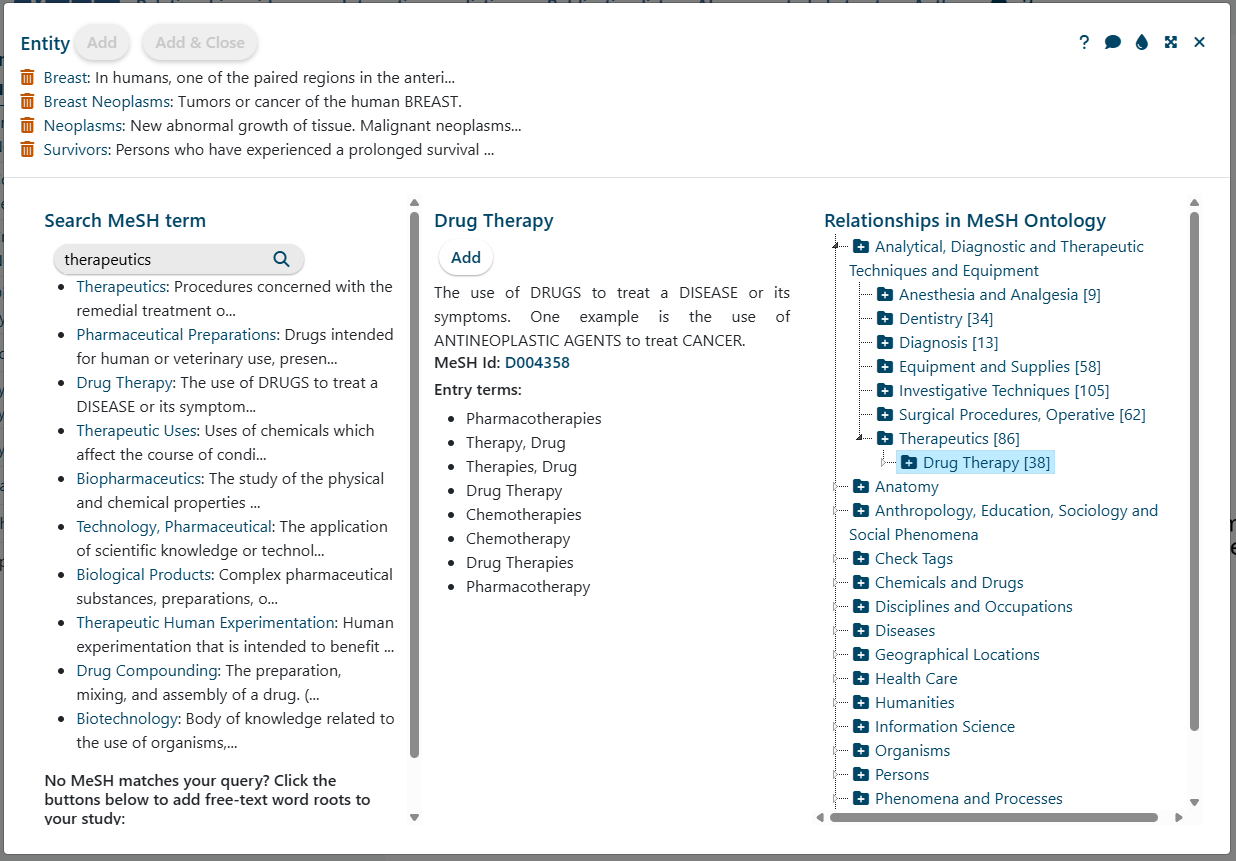
MeSH Thesaurus Integration: You define your study using biomedical concepts rather than just keywords. By integrating the MeSH thesaurus (Medical Subject Headings), the system automatically accounts for the various names and acronyms of a biological entity.
Infinite Precision: You can combine MeSH terms in countless ways to create new, highly precise composite entities.
Weighted Searches: Use weighting factors to specify the importance of different entities within your query.
Keyword Fallback: If you can't find a MeSH concept that perfectly matches your idea, you can still use keywords, just like in a regular search engine.
Advanced Ranking and Results
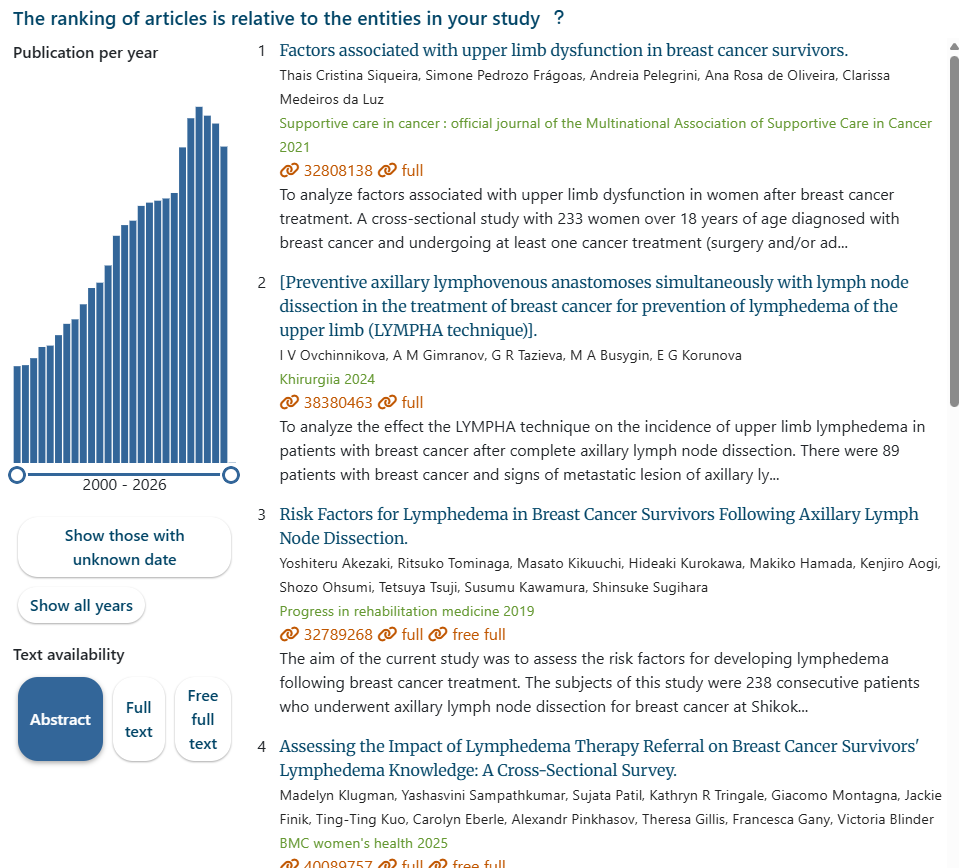
Once you define your study's entities, our search engine ranks the 40 million abstracts based on the biological entities and keywords you specified.
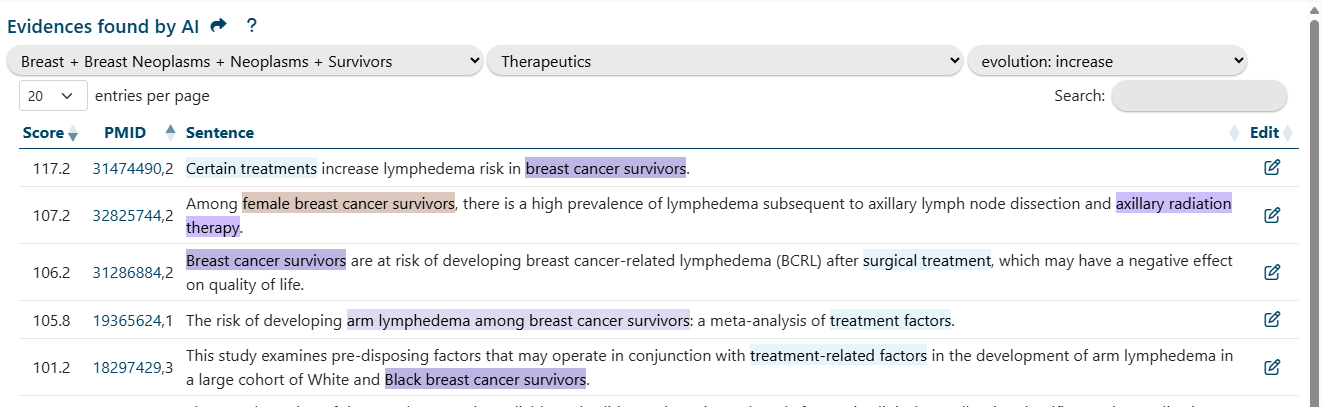
Evidence-Based Context: You can simply click on a link within your interaction network to retrieve the most relevant article sentences that explain the relationship between two entities, all within the context of your specific query.
Experimental Filters: We've added modules to filter sentences based on 39 different types of relationships (e.g., increase, advantage, molecular interaction, long-range interaction, etc.).
AI-Driven Prediction Module
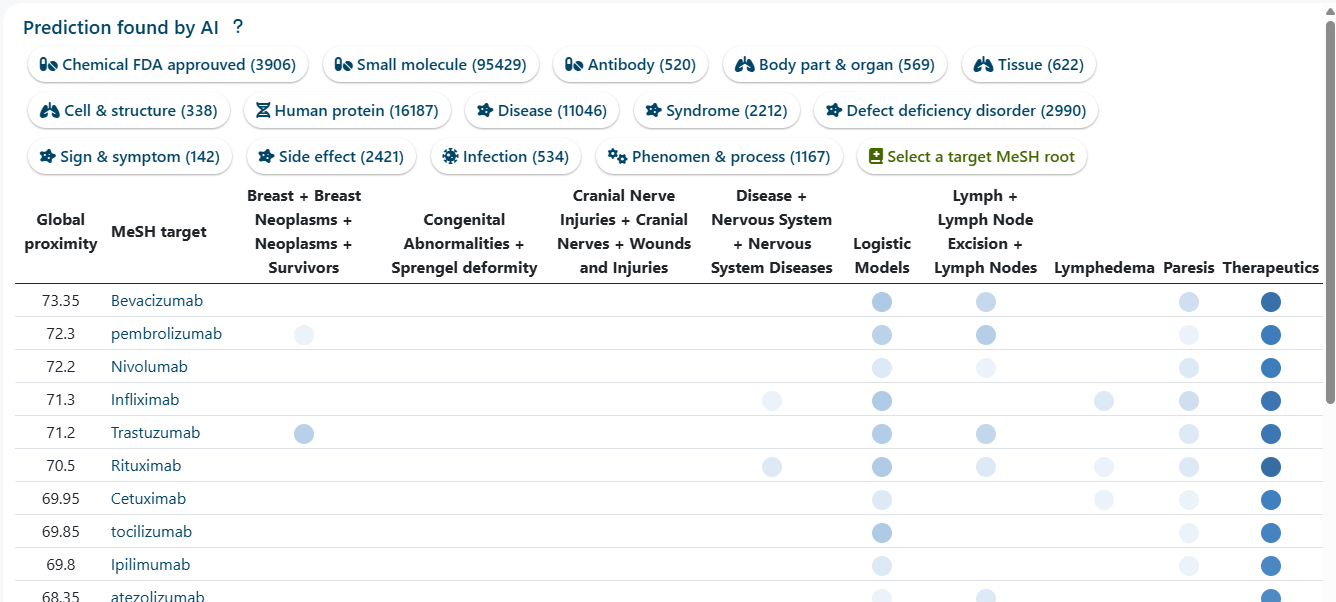
Leveraging our enormous relationship graph, we trained an AI model to predict potential unknown links.
Custom Prediction: You can select from a list of predefined targets or build your own list from the MeSH tree to find which MeSH targets are most relevant to your study.
Evidence Included: Each prediction includes a link to the original supporting sentences as evidence available in our database, which potentially explain the predicted relationship.
AI-Augmented Abstract & Author Information
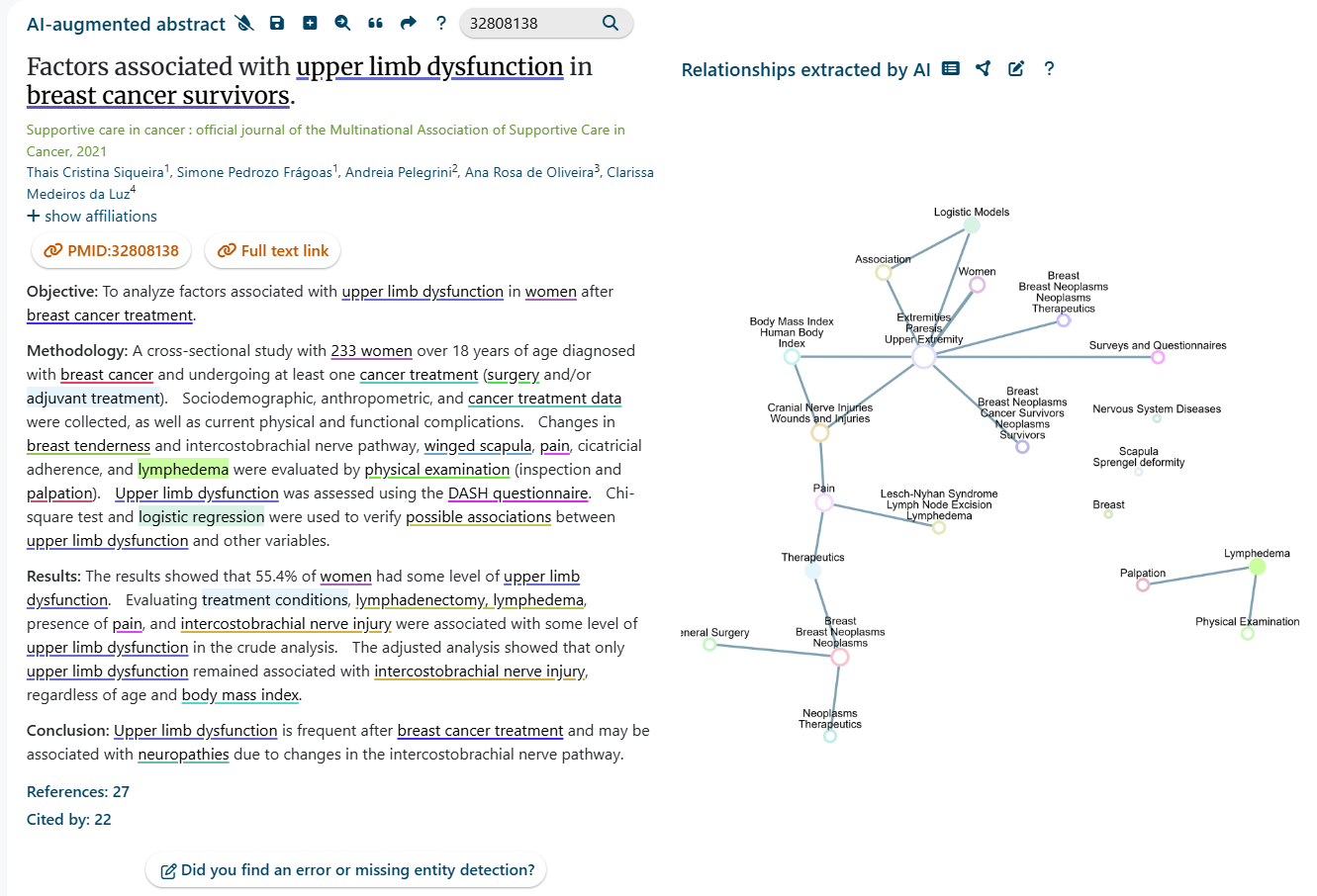
Abstract Highlighting: Thanks to manual annotations, we can significantly accelerate your reading of an abstract by clearly highlighting the entities relevant to your specific study.
Entity Discovery: Other identified entities are underlined. A simple click allows you to add new entities to your study, further refining your focus.
Relationship Visualization: We also display a graph of the relationships between biomedical entities, enabling you to access relevant supporting sentences with a single click.
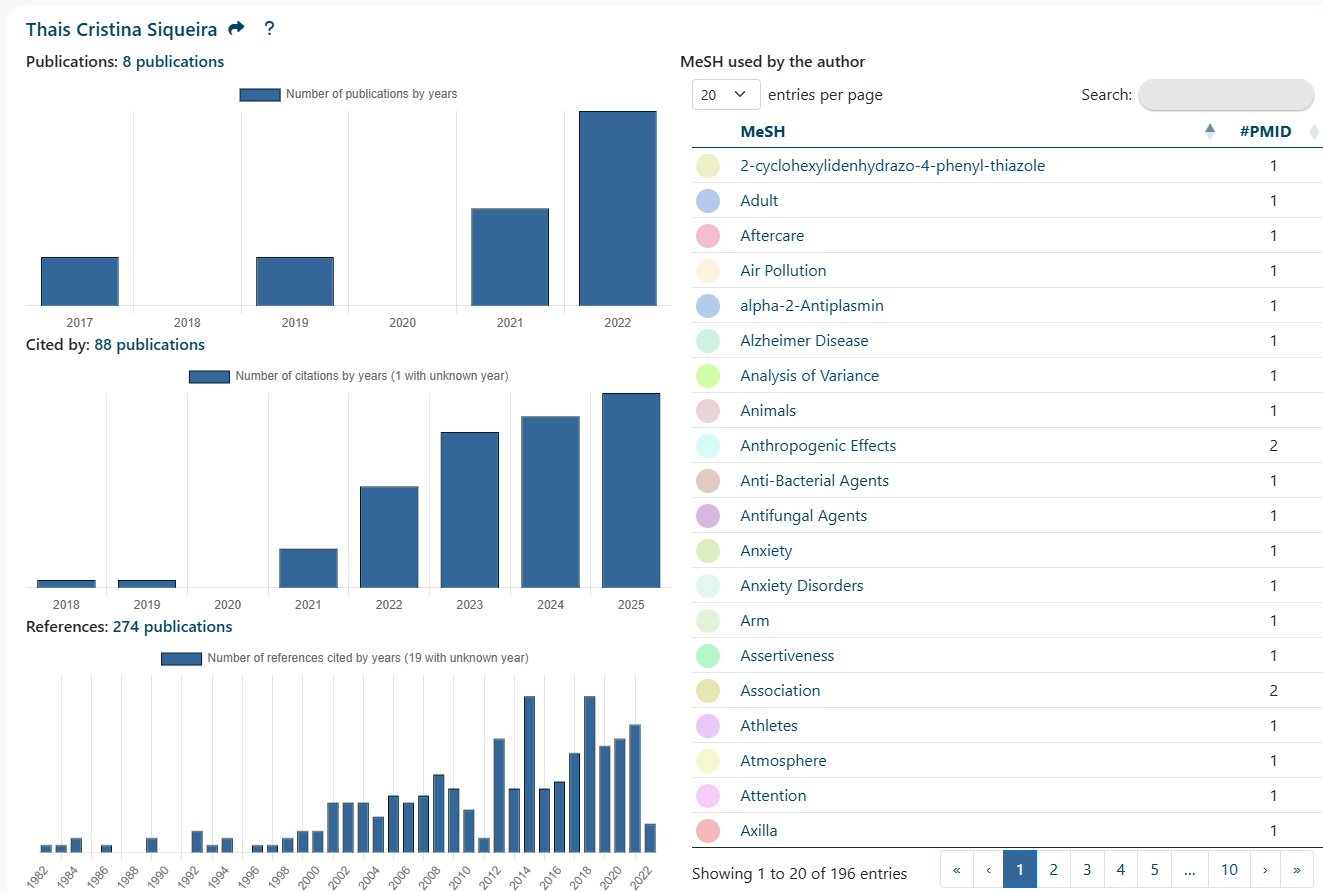
Author Profile: The dedicated author page features three insightful histograms: one detailing the author's publications, one showing publications that cite the author, and one displaying all references utilized. Additionally, a table provides a complete list of MeSH terms used by the author.
Help Improve Our Models
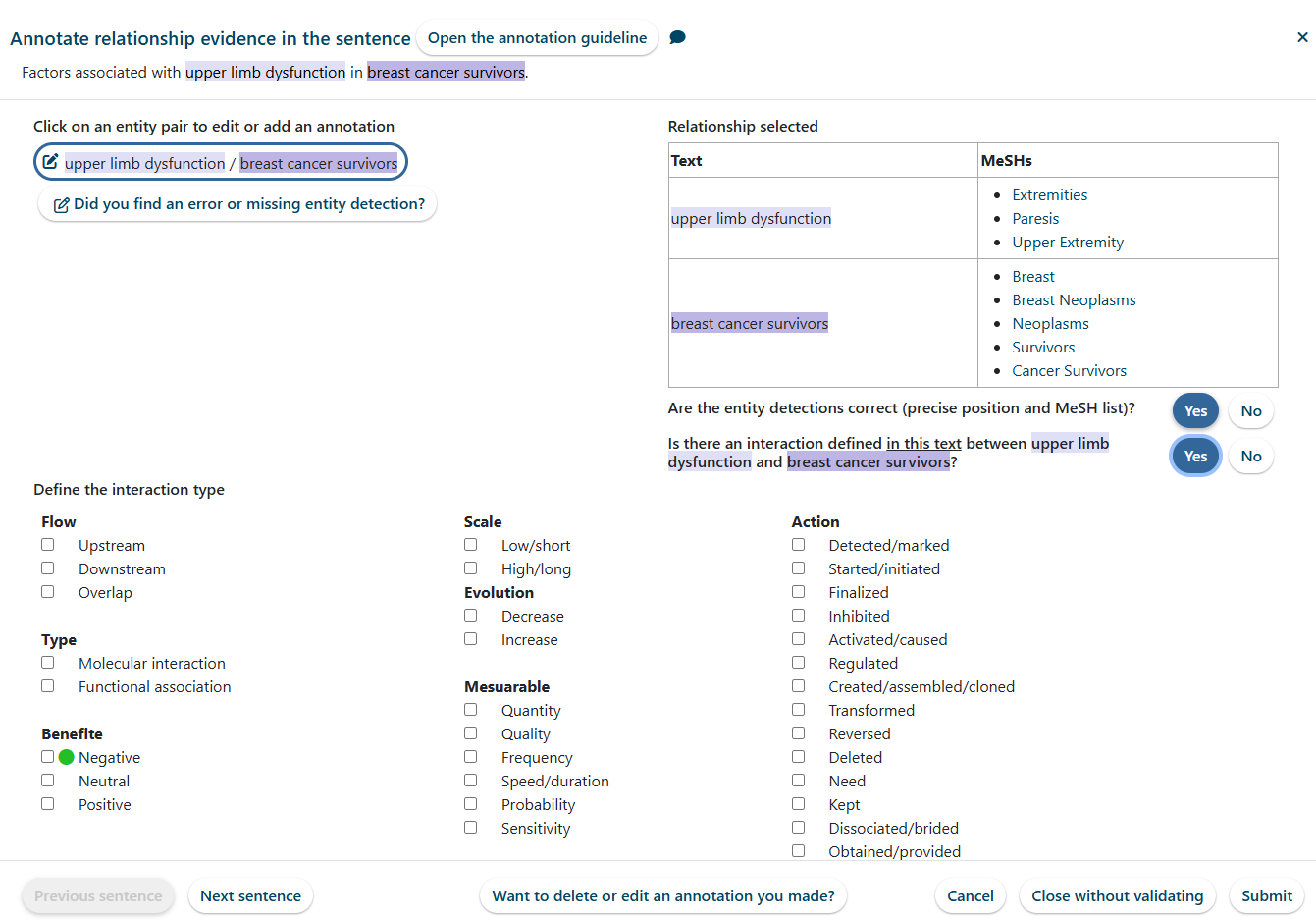
We've developed a set of tools that allow you to help us correct errors made by the AI systems, enabling us to build even better models.
Your Personalized Data
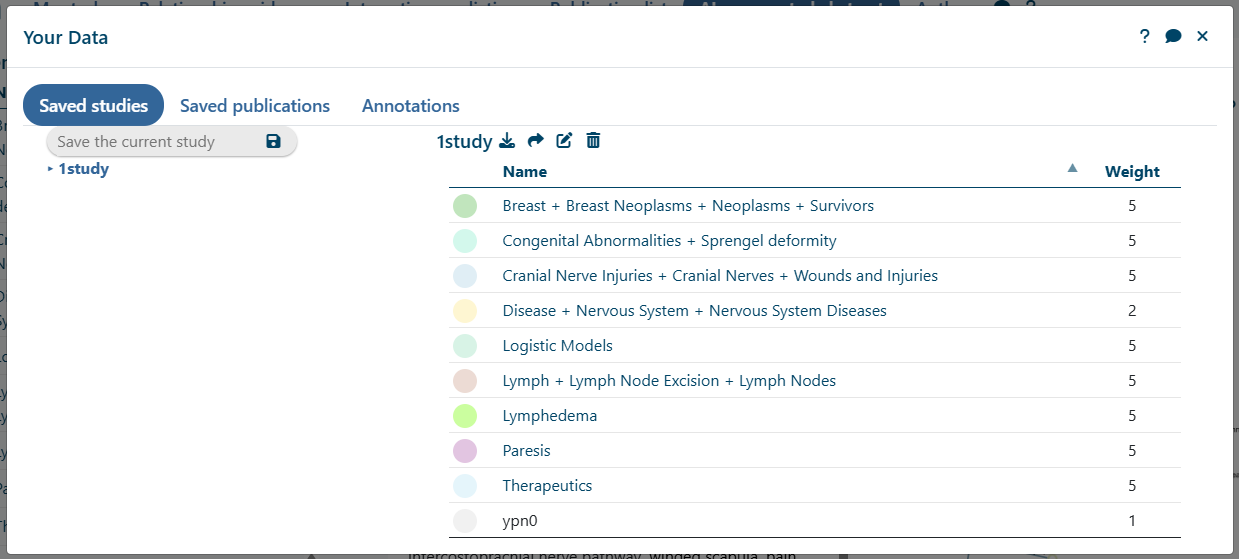
Study Preservation: Once you connect using a LinkedIn or Patreon account, you can save your studies and lists of articles.
Annotation History: You can also review all the annotations you have personally added to help correct and improve our automated AI systems.
Support and Sustainability
The database currently contains approximately 40 million abstracts of publications referenced on PubMed and will integrate 1.5 million new ones each year.
Cost of Curation: It is time-consuming and expensive to automatically annotate all these texts using our AI models. Despite extensive optimizations, the initial calculation took several months on a GPU-equipped server, and it will take more than three months of annual calculation just to keep the database up to date.
Funding: To finance this platform, we created a Patreon page: www.patreon.com/Quaesia.
Your Impact: With your generous donations, we can continue to maintain this platform and develop new, cutting-edge tools for the entire scientific community.

Study Description
AI-Discovered Relationships
Study Interaction Map
Define your study and explore the relationships by clicking a link in the Interaction Map.
Wait...
AI-Discovered Relationships
Your entities or their weighting factors have changed. As a result, the ranking below may no longer be up to date.
The system for relationship extraction is currently experimental. Since we lack sufficient manual annotations to train more efficient AI models, we invite your help. Please contribute annotations by clicking a button at the end of each line.
Score
PMID
Sentence
Edit
To limit resource costs, the table is restricted to the first 1,000 publications most relevant to your study. The more entities your study contains, the better the algorithm ranks the sentences. You can add new entities, even with a low weighting factor.
AI-Predicted Interactions
Build your study, and then select a MeSH target buttons
Wait...
Your entities or their weighting factors have changed. As a result, the ranking below may no longer be up to date.
How to Get Publications
Run a Search: Build your study and select in the sidebar
View Lists: Click any publication list (such as the number beside "References" or "Cited By" in the article or author profiles).
Your entities or their weighting factors have changed. As a result, the ranking below may no longer be up to date.
Publications Per Year
Filter by Text Access
AI-augmented abstract
Click a publication link or enter a PMID in the field above.
Unknown PMID
show affiliations hide affiliations
AI-Discovered Relationships
Click an author's link in the "AI-augmented abstract" tab
Publications:
Cited by:
References:
MeSH Usage by Author
Color
MeSH
#PMID
Tutorials
AI-Discovered Relationships between
PMID
Sentence
Entity A
Entity B
Edit
Select a Sentence to Add a Relationship Evidence
Edit Relationship Evidence
Click an entity pair to edit or add an annotation
Current Relationship
Text
MeSH
Are the entity detections correct (including precise position and selected MeSH terms)?
Does this text define an interaction between and ?
Click Submit to remove the relationship evidence for this entity pair in the text
Interaction Type Selection
Flow Type Benefite
Scale Evolution Mesuarable
Action
Add Custom Interaction Terms
Rate the importance of the relationship described in this sentence:
Edit Entity Detection
1. Define Entity Concepts:
Specify the MeSH terms that constitute the target entity:
Correct Existing Entity: Click an entity below to correct all citations already associated with it
Copy Existing MeSH Terms: Copy the MeSH terms of an entity using the button
Create New Entity: Create a new entity from scratch using the button.
Annotated entities
2. Select Entity Text: Mark all words in the text that correspond to the defined entity.
Sentence Scope: Annotations must be confined to a single sentence.Starting Point: Begin by defining the entity you wish to annotate in the upper-left panel.
Selecting Text Occurrences:
Click an underlined text to select an existing occurrence.
Click a boxed text to deselect an existing occurrence.
To add a new occurrence, use your mouse to select the text precisely, excluding any leading/trailing spaces or punctuation.
3. Validate MeSH Association: Review and confirm the associated MeSH terms.
4. Review Deleted Occurrences: Examine the text occurrences slated for deletion (if any)
5. Identify Pronouns & Acronyms: Verify any occurrences that match acronyms or pronouns referring to the entity.
You must add entities to your study before saving.
This name is already in use.
Rename ""?
This name is already in use.
Confirm deletion of "". This action cannot be undone.
C
Name
Weight
This name is already in use.
This publication is already included in the list.
Rename ""?
This name is already in use.
Confirm deletion of "". This action cannot be undone.
Num
PMID
Title
Delete
Add the current publication to the selected list
Date
Annotation
Edit
Cancel
Confirm deletion of "". This action cannot be undone.
Entity
Search MeSH Terms
MeSH Ontological Relationships
Select Color
Hue:
Saturation:
Is the color too bland?
Lightness:
Is the color too dark?Is the color too light?
Entity name
Entity name
Download Database
Quaesia Database Statistics
The Quaesia database is available for download in JSON format. This database includes
#Entry
Type
39,536,075
PMIDs
286,629,063
Sentences
864,041,973
Entity Detections
676,636,631
Relation Extraction
11,136,741
Lemmatized words
22,754,241
Authors
355,035
MeSH terms
72,514,681
MeSH pairs in relation extraction
508,106,655
MeSH pairs in relation extraction (typed by 39 interaction terms)
1,986,710
MeSH mappings to external database ID
Database Architecture and Tools
This database was built using a MongoDB system. A full description of the architecture and data model is available here: Database Description.
In addition to the base data, we offer the following resources for download:
Python Utilities: A Python script to load the database into a MongoDB system, along with a set of example queries and model scripts.
Information Retrieval Model: A pre-trained model designed to rank PMIDs based on a query that includes MeSH terms and lemmatized words.
Prediction Interaction Model:
A pre-trained ProNE model available for predicting affinity between entities.
FTP Server Connection Details
Host
Port
User
Password
My Licences
Invoice
Date
Amount
Open
Licensing and Pricing Plans
To cover the extensive costs associated with generating and maintaining the database, models, and scripts, a license fee is required. All licenses include unlimited downloads for one year of the full database, models, and scripts.
Organization Type
Employee Size
Annual Fee (EUR)
Nonprofit
All sizes
€200
Company or for-profit structure
<10 employees
€300
10 to 100 employees
€600
100 to 250 employees
€1,000
>250 employees
€2,500
Payment of the license fee grants you the right to download and use the entire database, including all updates, for a period of one year. Please read the full Licence carefully to understand all rights and prohibitions. In summary:
Permitted Uses (Rights)
You may use the database to support your activities, including training AI models, building search engines, or generating therapeutic insights.
Commercial use is permitted, except under the Nonprofit license.
Prohibited Uses (Restrictions)
You may not resell the database, either in its original form or modified.
You must respect the individual licenses of any external databases included within this dataset.
Required Attribution (Obligation)
You must cite the Quaesia website for any public use or dissemination of the database or its derived data.
To access the download form, log in using your LinkedIn or Patreon account. We utilize these platforms as trusted third-party providers via OpenID Connect to quickly and securely verify your identity.
By signing up, you agree to our End-User License Agreement and Privacy Policy
Database Download and Licensing Steps
To complete your license and access the database download, please follow the steps below:
Complete the Registration Form: Provide the necessary information required for the license agreement.
Access Payment: You will be redirected to the payment module, processed securely via Stripe.
Confirmation and Access: Once payment is validated, you will receive an email notification that your account on Quaesia has been updated.
Key Account Deliverables
Within your account, you will find:
Your personalized License Agreement.
The unique connection details for the FTP download server.
License Restriction
The FTP connection details are personal and unique to this license. As specified in the terms, you must not transmit this information to anyone outside of your organization.
Report an Issue
Please provide the following details to help us investigate the issue:
The Issue: Clearly describe the problem you encountered.
Steps to Reproduce: Detail the exact actions you took before the issue occurred.
Expected Result: Describe what you anticipated would happen.
Actual Result: Describe the specific error or results you observed.
Contact Us
Cite
Share
Log In
We use LinkedIn and Patreon as trusted third parties, utilizing the OpenID Connect protocol to securely verify your identity.
By logging in, you gain the ability to:
Save your customized studies and article lists.
Correct automatic annotations, which directly helps us build better AI mdels.
We use Patreon as trusted third parties, utilizing the OpenID Connect protocol to securely verify your identity. By logging in, you gain the ability to:
Save your customized studies and article lists.
Correct automatic annotations, which directly helps us build better AI mdels.
We use Patreon as trusted third parties, utilizing the OpenID Connect protocol to securely verify your identity. By logging in, you gain the ability to:
Save your customized studies and article lists.
Correct automatic annotations, which directly helps us build better AI mdels.
We use Patreon as trusted third parties, utilizing the OpenID Connect protocol to securely verify your identity. By logging in, you gain the ability to:
Save your customized studies and article lists.
Correct automatic annotations, which directly helps us build better AI mdels.